Sep 2024 – Apr 2025 · ROS 2 · Jetson Orin NX · Team lead
Frontier-Based Autonomous Exploration Vehicle
Led a team to develop an autonomous exploration system using ROS2 and LiDAR. Implemented SLAM algorithms including Cartographer and Navigation2 for real-time mapping and path planning. Integrated YOLOv11 for object detection and deployed the complete system on embedded hardware.
Demo
Overview
Search and rescue after a disaster is a race against time, and debris, heat or radiation often make the site too dangerous for people to enter first. This project builds a small tracked robot that goes in ahead of them: it explores an unknown indoor space on its own, builds the map as it drives, and marks every person it finds on that map, so rescuers know where to go before they set foot inside.
Everything runs on board in ROS 2: Cartographer for SLAM, Navigation2 for planning and control, YOLOv11 with a depth camera for finding casualties, and my frontier-exploration node that decides where to go next.
1. System architecture & task modes
The robot works in two modes. In exploration mode it maps an unknown building and records casualties as it goes; in rescue mode it reloads that map and drives to each recorded casualty in turn.
2. Hardware integration
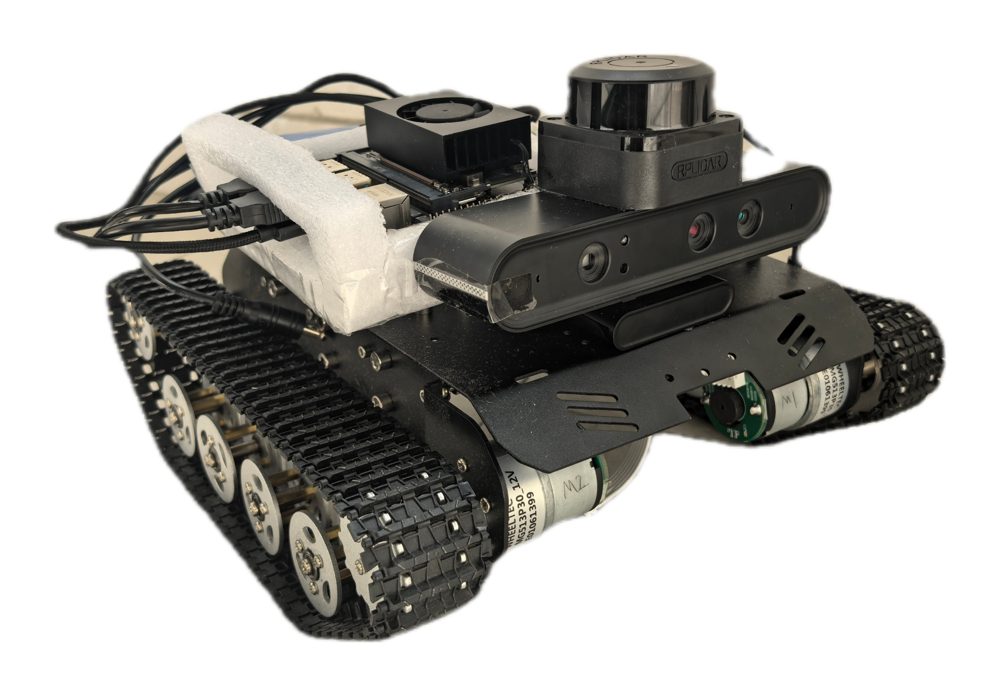
| Component | Role | Key specification |
|---|---|---|
| Jetson Orin NX 16GB | Onboard computer, runs all of ROS 2 | Ubuntu 22.04 · ROS 2 Humble |
| RPLIDAR C1 | 2D LiDAR for SLAM and costmaps | ToF · 0.05–12 m range · 8–12 Hz scan |
| Orbbec Astra Pro Plus | RGB-D camera for casualty detection | Depth 0.6–8 m · up to 640×480 @ 30 fps · RGB FOV 66.01° × 40.2° |
| STM32F407VET6 + MPU6050 | Motor control and IMU | Cortex-M4 · 168 MHz |
| MG513 DC motors | Tracked drive | Up to 1.1 m/s · 3 kg payload |
3. Casualty detection & 3D localization
A bounding box is not enough to place a person on a map: its corners fall on the floor and the wall behind, so the depth inside it is mostly background. The detector therefore uses YOLOv11 segmentation, and only depth pixels inside the person’s mask are used.
With \(x_{cen}\) the horizontal centre of the mask, \(W_{img}\) the image width and \(\theta_{FOV}\) the camera’s horizontal field of view:
\[\theta_{off} = \frac{2x_{cen} - W_{img}}{2W_{img}} \cdot \theta_{FOV}\] \[x_c = d_{tar}\sin\theta_{off}, \qquad y_c = d_{tar}\cos\theta_{off}\]Each position is saved with the map, and these are the goals the rescue mode later drives to.
4. SLAM odometry bridge
Cartographer provides the robot pose as TF transforms, while the navigation and localization nodes expect a nav_msgs/Odometry stream with velocities. A small bridge node converts one into the other:
- Look up
map → odomandodom → base_linkand compose the robot pose, \(T_{mb} = T_{mo} \cdot T_{ob}\), giving position \(p = [x, y, z]^T\) and orientation quaternion \(q\). - Convert \(q\) to roll, pitch and yaw.
- Differentiate in time: \(v(t) \approx \dfrac{p_{mb}(t) - p_{mb}(t_{prev})}{\Delta t}\), and the yaw rate from the wrapped yaw difference.
- Publish
/odometry/filteredwith pose, twist and covariance.
5. Optimized frontier exploration
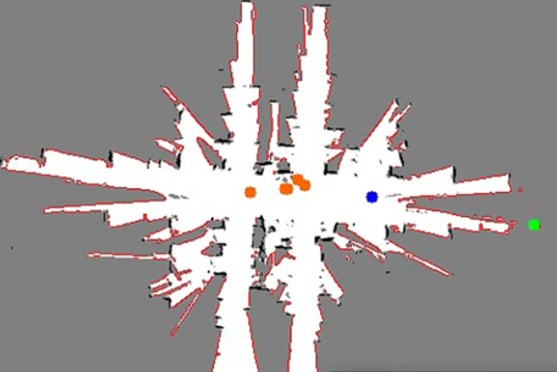
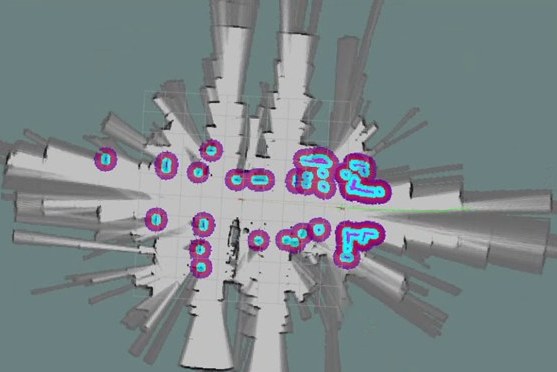
Classic frontier exploration drives to the nearest frontier, which wastes time on tiny pockets and doubles back across the map. My node scores every frontier by how much unknown space it would reveal against how far the robot must drive to reach it:
- Preprocess — subscribe to Cartographer’s occupancy grid and reshape it into a 2D array.
- Detect frontiers — run Canny edge detection on the boundary between known free space and unknown space.
- Decide — pick the frontier with the best gain–cost trade-off and send it to Nav2 as the next goal.
\(I_f\) counts the weighted unknown cells within radius \(r\) of frontier \(f\); \(D_f\) is the path length from the robot position \(p\); \(w_1, w_2\) set the trade-off.
6. Field experiments
A real rescue is a large, complex space under time pressure, so the test asks a simple question: how much area does the robot search in five minutes? It was run in three indoor environments with different layouts, under three speed limits, three runs each — 27 runs in total.
What the numbers say. The best speed limit depends on the layout. In the long, open teaching-area corridor, a faster robot simply covers more ground. In the narrow dormitory corridor, turns and tight passages cap the gain once the limit passes 0.6 m/s. In the cluttered laboratory, 0.9 m/s explores no more than 0.6 m/s. A single hand-tuned speed limit is therefore a compromise.
7. Takeaways
Simple by today’s standards, but a complete real-robot loop built from individual parts — sensors, embedded control, SLAM, navigation, perception and decision-making — and the deployment skills used in every later project started here.
The experiments also pointed to what came next. The thesis proposed two directions: tuning exploration parameters such as the speed limit online with model-free RL instead of by hand, and replacing the modular LiDAR stack with model-based, end-to-end RL from vision alone. Learning-based navigation is the line my later research followed.